
Vendor Change App
User Guide

Overview
Easily manage vendor changes on unposted purchase documents in Business Central without losing line details. This extension preserves line details and custom fields, including dimensions to avoid losing this information and having to re-enter it whenever you change the vendor on Purchase Orders, Purchase Quotes, and Purchase Invoices. Save time with Vendor Change App by 365 Architechs Pty Ltd.
The standard behaviour in Business Central, is that line items are automatically removed when the Vendor is changed on purchase documents resulting in the required re-entry of every line item on the document.
Vendors sometimes need to be changed for many reasons, including errors during processing, when you are no longer able to purchase from that supplier, when a credit limit has been exceeded, or where a better price or more favourable terms is found with another supplier.
Version 1.0.0.0 of this apps supports retention of line items in Purchase Orders, Purchase Invoices and Purchase Quotes. This version of the app works only for line type G/L Account, Fixed Asset & Resource.
Features and Benefits of using this app:
- Easily change the vendor number of an existing document
- Avoid the effort associated with writing down all the lines of a document, changing the vendor, and then re-entering all the lines
- Reduce the risk of a data entry mistake when re-keying the lines on a document where the vendor number has been changed
This solution will help purchasing officers, accounts payable clerks and anyone who enters or maintains purchase documents in Business Central.
App Installation
The Vendor Change App can be downloaded for free from AppSource https://appsource.microsoft.com/
Please see the installation guide here URL
Version Details
Version 1.0.0.0 of this apps supports retention of line items in Purchase Orders, Purchase Invoices and Purchase Quotes. The next version will support Purchase Credit Memos and Purchase Return Orders. This version of the app works only for line type G/L Account, Fixed Asset & Resource.
365A Legals and Privacy Statement (Click to view)
User Guide
Step 1. Open an unposted Purchase Document
Vendor Change is available for unposted Purchase Order, Purchase Quote, or Purchase Invoice
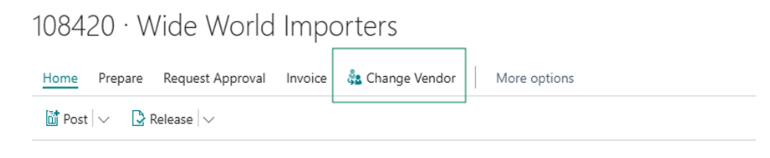
Step 2. Click Change Vendor
This is located on the action menu
Step 3. Input New Vendor No.
In the Change Vendor pop-up, type Vendor No. or Vendor Name into the New Vendor No. field.
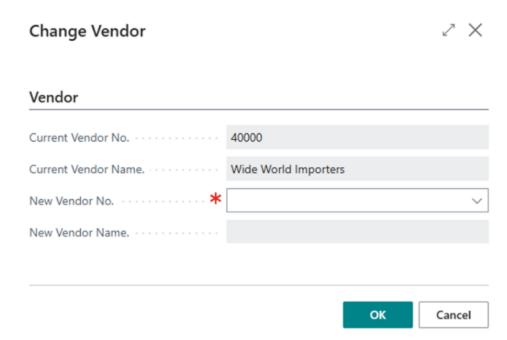
Step 4. Click OK
Once the New Vendor No. has been chosen, clicking on the OK button will apply this change.
Step 5. Process Purchase Document
Once details are verified, continue with normal purchase document processing.