Modern cloud telephony for growing organisations
The latest tech news to drive your digital transformation.
Articles
Brochures
Information Sheets
Whitepapers
Readiness and preparedness for the unexpected
Business has changed in our digitally driven world.
Cybersecurity
Artificial Intelligence
Digital Transformation
Licence Management
Events
Robust security solutions for small businesses.
Business Central
Dynamics 365
Azure
Microsoft 365
Microsoft Teams
Crafting innovative solutions every time.
Transparency and integrity underpin everything we do.
Speak to us about your digital transformation
Join the digital disruption newsletter to receive leading edge technology insights and updates.
Use account with administrative or extension management privileges.
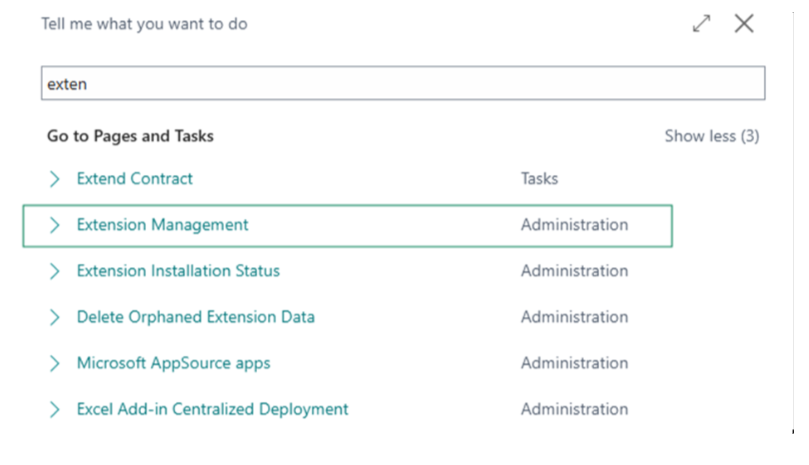
Search for “Extension Management” in Tell Me using the search icon.
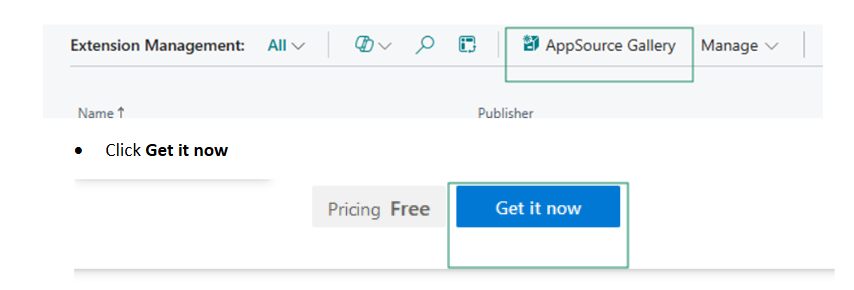
Click on AppSource Gallery from Menu Actions
Agree to the terms and conditions, select the environment where you want the app installed, then conform the installation.
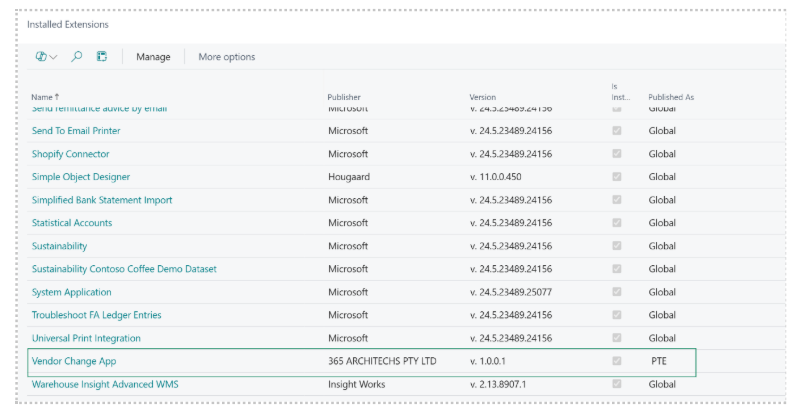
Verify that the app appears in Extension Management as Installed.
About Us
Corporate Info
Contact Us
Subscribe